
Ad tracking parameters
Google Ads tracking parameters
Add ThoughtMetric tracking parameters to your Google ads.
For the most accurate tracking of your Google Ads, add the ThoughtMetric tracking parameters to your Google Ads by following this guide.
Tracking parameter
The ThoughtMetric tracking parameter for Google Ads is:
{lpurl}?tmsrc=googlead&tmcid={campaignid}&tmsid={adgroupid}&tmid={creative}&tmkw={keyword}Add the parameter to your Google Ads
-
Copy the ThoughtMetric tracking parameter.
-
Paste the tracking parameter into your account settings
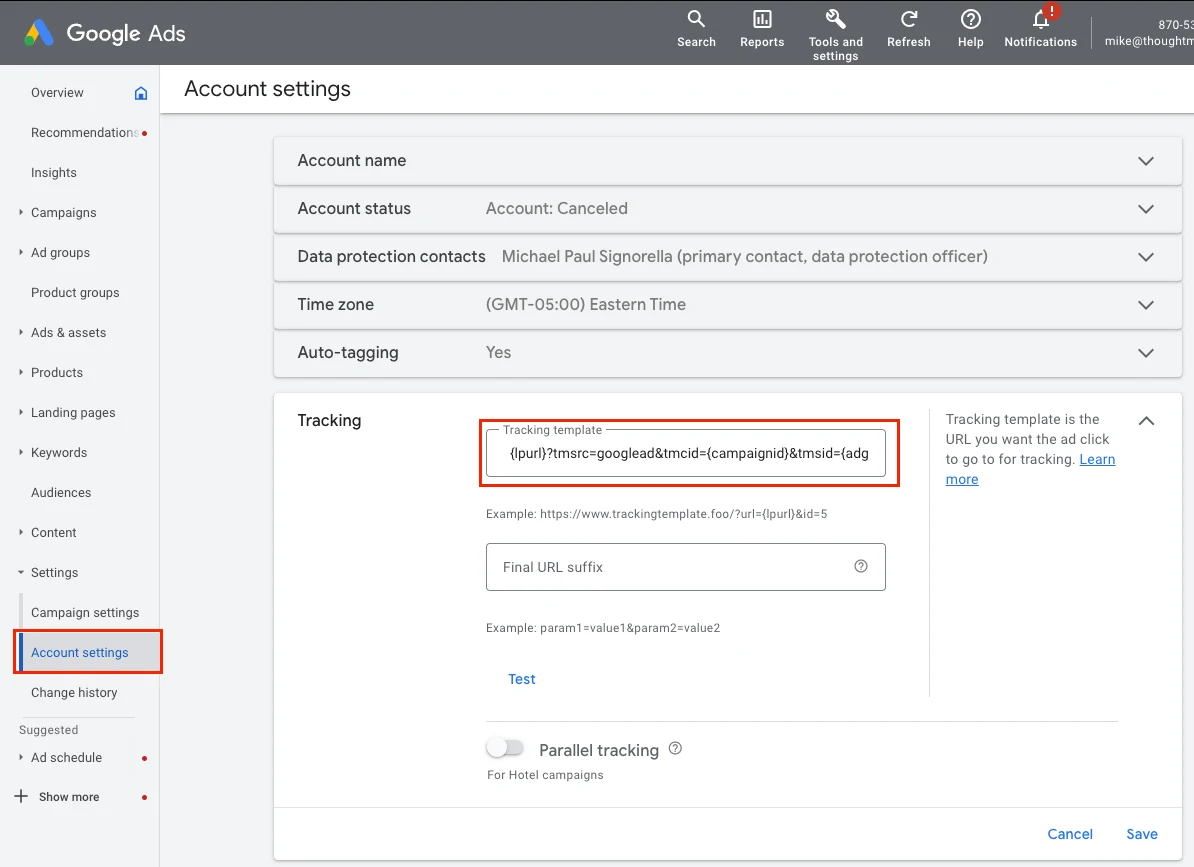
Navigate to the Account Settings page of your Google Ads account and paste the tracking parameter into the Tracking template text box.
Keep your existing tracking parameters
If you already have tracking parameters in the tracking template field, you can use the ThoughtMetric tracking parameters in addition to any tracking you already have in place.
To do this, append the ThoughtMetric tracking parameters to the end of your existing UTM string with an & symbol, starting with the tmsrc parameter.
For example, if your tracking template already contains this text:
{lpurl}?utm_source=googleAppend the ThoughtMetric tracking parameters so that the end result looks like this:
{lpurl}?utm_source=google&tmsrc=googlead&tmcid={campaignid}&tmsid={adgroupid}&tmid={creative}&tmkw={keyword}