
Ad tracking parameters
Facebook Ads tracking parameters
Add ThoughtMetric tracking parameters to your Facebook ads.
For the most accurate tracking of your Facebook Ads, add the ThoughtMetric tracking parameter to your Facebook Ads by following this guide.
Tracking parameter
The ThoughtMetric tracking parameter for Facebook Ads is:
tmsrc=facebookad&tmcid={{campaign.id}}&tmsid={{adset.id}}&tmid={{ad.id}}Add the parameter to your Facebook Ads
-
Copy the ThoughtMetric tracking parameter.
-
Paste the tracking parameter into every ad
Place the ThoughtMetric tracking parameters in the tracking area of every ad in your ad account.
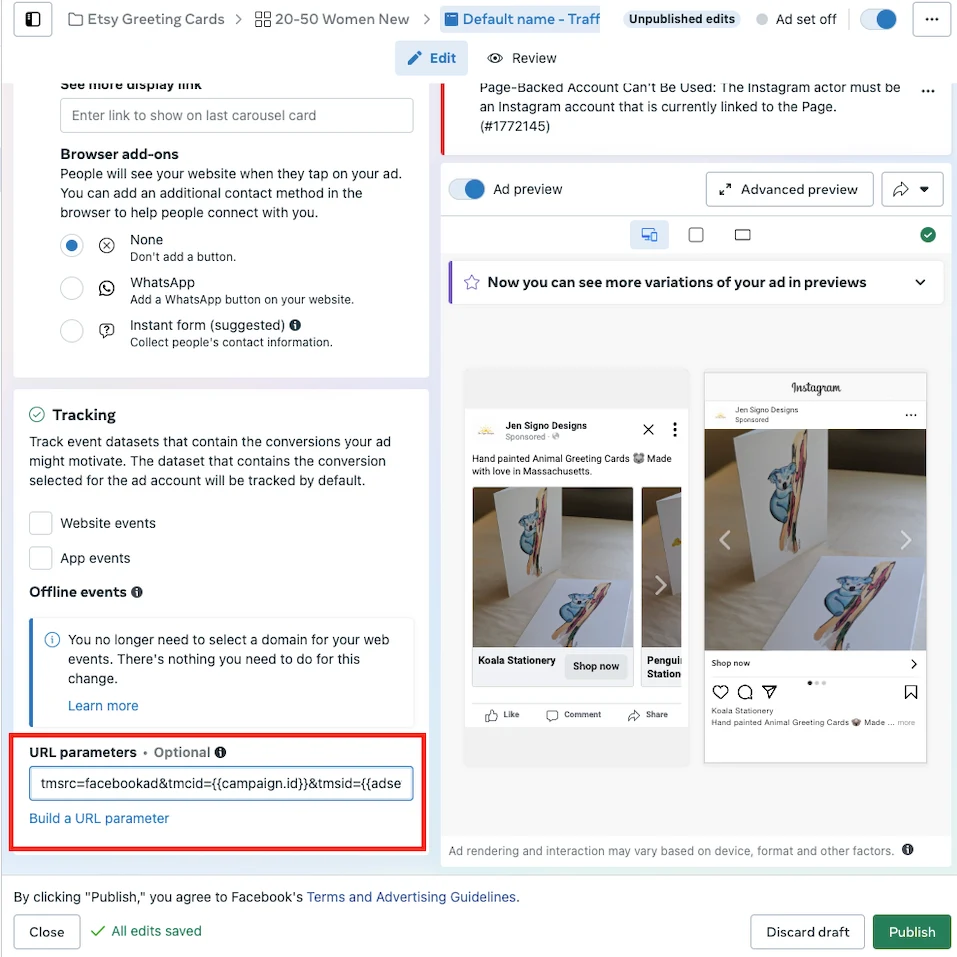
Note: Updating ads resets the learning phase and requires Facebook to review and re-approve your ads. If you don't want this, we recommend placing the tracking parameters only on new campaigns as you create them and leaving old ones alone.
Keep your existing tracking parameters
If you already have tracking parameters in the URL parameters field, you can use the ThoughtMetric tracking parameters in addition to any tracking you already have in place.
To do this, append the ThoughtMetric tracking parameters to the end of your existing UTM string with an & symbol, starting with the tmsrc parameter.
For example, if your URL parameters field already contains this text:
utm_source=facebookAppend the ThoughtMetric tracking parameters so that the end result looks like this:
utm_source=facebook&tmsrc=facebookad&tmcid={{campaign.id}}&tmsid={{adset.id}}&tmid={{ad.id}}